Additional information: what fills your bundle on its own
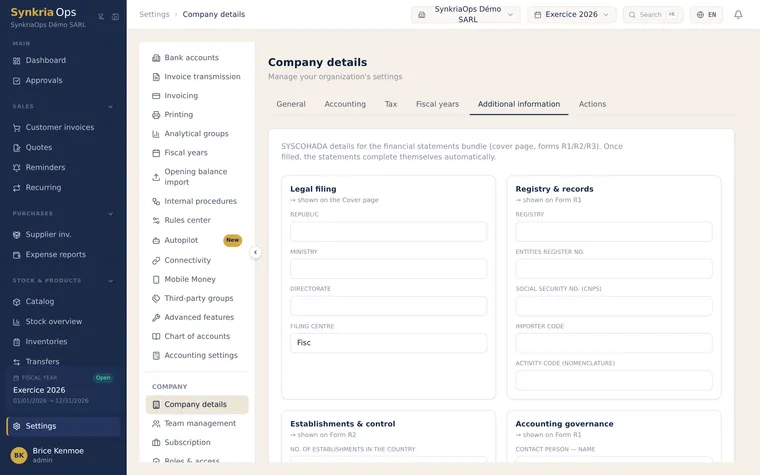
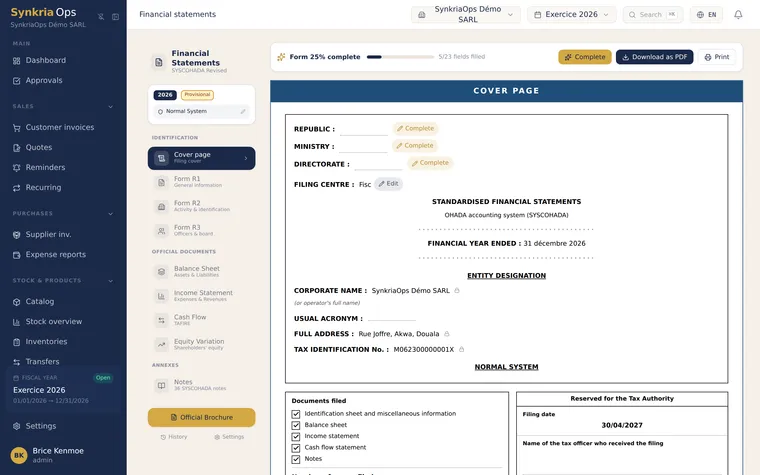
The SYSCOHADA bundle doesn’t start with numbers — it starts with the identification of the company. This information isn’t entered inside the bundle itself — you fill it in once, under Settings → Company information → Additional information tab, and SynkriaOps then fills in the cover page and the R1, R2 and R3 sheets for you.
What you fill in here
Section titled “What you fill in here”-
Entity identity
Company name, legal form, registration number, address, fiscal-year length — the regulatory header of every statement.
-
Governance
Officers and members of the governing bodies: name, title, term. These are the lists that feed the identification sheets.
-
Activities
The activities carried out by the company, as they must appear in the bundle.
Where it shows up in the bundle
Section titled “Where it shows up in the bundle”The cover page and the identification sheets are generated already filled in with what you entered:
Further reading
Section titled “Further reading”- Generate the bundle and its notes — the next step in the workflow
- Accounting settings — choose the bundle model before you start
- Closing a fiscal year — when to produce the bundle