File your VAT return
Beyond configuring VAT rates, SynkriaOps prepares your VAT return: it aggregates the VAT collected on your sales and the deductible VAT on your purchases, computes the net VAT to pay (or the credit), and produces the statements to file.
Return periods
Section titled “Return periods”VAT is filed by period (generally monthly). Each period aggregates the operations whose tax point falls within the interval. SynkriaOps opens periods according to your regime and fiscal year.
The deduction proration
Section titled “The deduction proration”If your activity mixes taxable and exempt operations, not all purchase VAT is deductible: a deduction proration applies. It is configured per fiscal year and automatically weights the deductible VAT retained in the return.
Generate a return
Section titled “Generate a return”-
Open the module
Main menu → Tax / VAT → Returns.
-
Choose the period
Select the period to file. SynkriaOps shows the VAT collected, the deductible VAT (weighted by the proration) and the estimated net VAT.
-
Check consistency
Run the consistency check: it compares the declared amounts against the VAT entries and flags any gap before filing.
-
Generate the return
Generate the return. The detailed lines (bases and taxes by rate) are produced.
-
File
Mark the return as filed once transmitted to the administration. A filed period is locked.
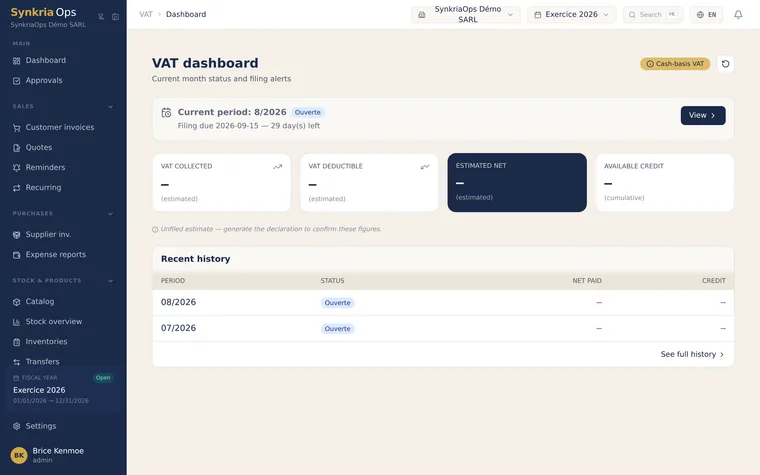
The VAT dashboard
Section titled “The VAT dashboard”A VAT dashboard gives a continuous view: estimated net VAT for the current period, regimes in force, configured VAT accounts. Useful to anticipate the amount to pay before the deadline.
Export the return
Section titled “Export the return”The return exports to PDF (for archiving and filing), CSV and XLSX (for reprocessing). The exports follow SynkriaOps’ consistent statement presentation.
Further reading
Section titled “Further reading”- Configure VAT rates — rates, regime, VAT accounts
- Create a customer invoice — VAT collected at source
- Record a supplier invoice — deductible VAT