Validation-rules engine (approval)
SynkriaOps includes a validation-rules engine: you can require a sensitive action (validate a piece, send an invoice, make a payment) to go through one or more approvals before being sealed. It is your internal-control tool.
What it’s for
Section titled “What it’s for”- Segregation of duties — the person who enters is not the person who validates.
- Dual validation — an action above a certain stake requires two approvers.
- Threshold delegation — below an amount, a manager is enough; above it, senior management steps in.
The “gate before seal” principle
Section titled “The “gate before seal” principle”When a circuit is active, the action doesn’t produce its effect immediately: it creates an approval request. The real effect (sealing the piece, sending, payment) is only triggered at the last approval.
Configure a circuit
Section titled “Configure a circuit”-
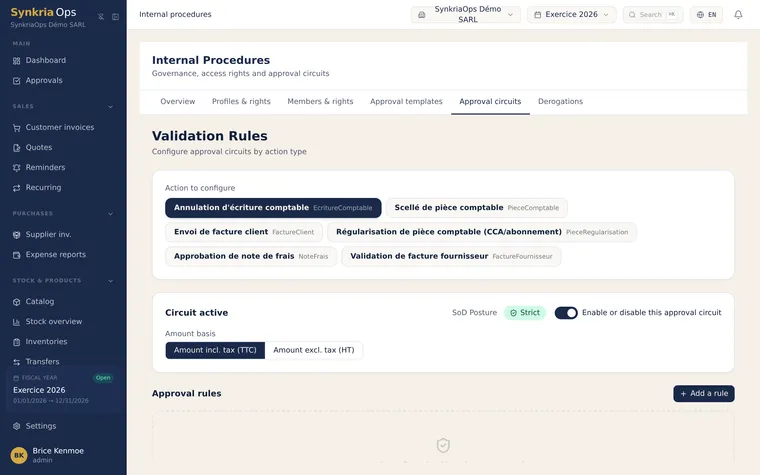
Open the validation circuits
Menu → Internal procedures, Circuits tab.
-
Choose the action to control
Select the sensitive action (for example “validate a piece” or “supplier payment”).
-
Define the circuit
Set the number of levels, the thresholds (amounts that trigger an extra validation) and who approves at each level.
-
Activate
The circuit becomes active: the actions concerned now go through the approval inbox.
A ready-made catalog, not a blank page
Section titled “A ready-made catalog, not a blank page”Configuring a circuit from scratch means thinking through thresholds, roles and exceptions — work most tenants don’t have time for. That’s why every tenant automatically inherits a catalog of 20+ templates, ready to activate in one click, organized by category:
| Category | What it controls | Example templates |
|---|---|---|
| Purchases | Supplier invoices before posting | Owner sign-off above 500,000 XAF · accountant then CFO above 2M · three tiers up to 10M · systematic control |
| Cash / Treasury | Payments and cash/bank movements | CFO sign-off above 1M · dual signature above 5M · 250,000 XAF cash ceiling · reinforced outgoing-cash control |
| Accounting | Entries, corrections, reversals | Review of manual journal entries · entries above 5M · sensitive accounts (suspense, losses, off-balance-sheet) · reversals always validated |
| Expense reports | Reimbursements to staff | Sign-off above 50,000 XAF · two tiers (50K and 500K) |
| Sales | Sending customer invoices | Review above 3M · systematic quality check before every send |
| Debt write-off | Writing off a receivable | Dual sign-off, CFO then owner, no threshold — an irreversible decision |
| Fixed assets | Disposal or scrapping | CFO sign-off before any asset leaves the books |
Each template shows a one-sentence description (e.g. “Above 500,000 XAF, a supplier invoice waits for the owner’s sign-off before being posted”) and is customized through simple variables: who approves, from what amount — without touching the rest of the circuit configuration.
The approval inbox
Section titled “The approval inbox”Approvers have an inbox: for each request, they can approve, reject, recall or override (depending on their rights). As long as a request is pending, the action stays frozen.
Traced flexibility, never silent
Section titled “Traced flexibility, never silent”An override of the segregation of duties is possible, but never silent: it is recorded and surfaced in an exception report (exportable), with a posture indicator. The approval journal is tamper-proof (no modification or deletion).
Further reading
Section titled “Further reading”- Roles & permissions — who can approve what
- Create an accounting entry — the most commonly controlled action
- Post & reverse an entry — the seal after approval