Depreciation schedules & charges
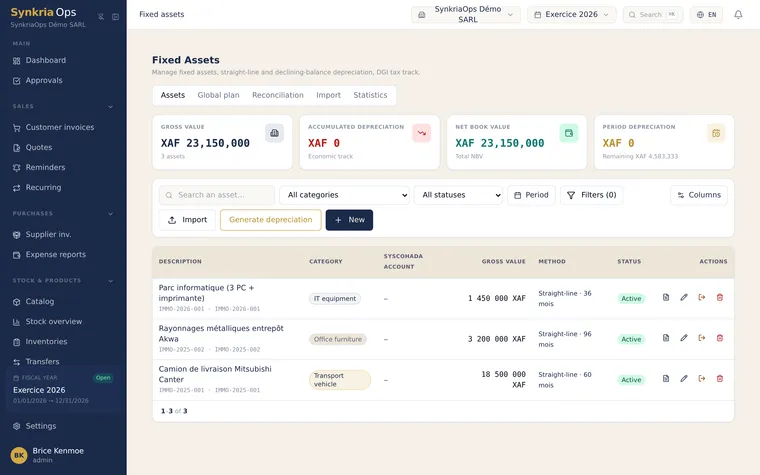
The depreciation schedule spreads an asset’s value over its useful life. Each fiscal year, a fraction of that value becomes an expense: the depreciation charge. SynkriaOps computes these charges and generates them in one click.
Set the schedule
Section titled “Set the schedule”When commissioning a fixed asset, enter:
| Parameter | Description |
|---|---|
| Depreciation duration | The number of years of use (e.g. 5 years for equipment) |
| Method | Straight-line (equal share each year) or another method depending on the asset |
| Commissioning date | The calculation’s starting point |
Generate a fiscal year’s charges
Section titled “Generate a fiscal year’s charges”Charges are not written automatically on a rolling basis: you generate them at closing, after review.
-
Open charges
Menu → Fixed assets → Charges. The list shows the ungenerated charges for the fiscal year.
-
Preview
Click Preview: SynkriaOps computes the amount of each charge, without writing anything. Check the amounts.
-
Generate
Once validated, click Generate. The charge entries are created (debit of a class 68 account, credit of a class 28 account).
Check with reconciliation
Section titled “Check with reconciliation”After generation, the reconciliation verifies that the register’s accumulated depreciation matches the balance of the class 28 accounts. Any gap is flagged for correction before producing the financial statements.
Further reading
Section titled “Further reading”- Dispose of a fixed asset — stop depreciating a disposed asset
- Close a fiscal year — the charges → close sequence
- SYSCOHADA Balance sheet — where depreciation appears