Understanding quote and invoice statuses
Every quote and every invoice carries a status badge. This page explains what each badge says, what you can do at that stage, and when the books are affected.
Quote and pro forma statuses
Section titled “Quote and pro forma statuses”| Status | What it means | What you can do |
|---|---|---|
| Pending | Saved, awaiting the customer’s answer | Accept, Refuse, Send, Edit |
| Accepted | The customer agreed | Convert to invoice, invoice progress |
| Refused | The customer declined | Duplicate to make a new proposal |
| Expired | The validity date passed without acceptance | Extend validity |
| Invoiced | An invoice was created from this document | Open the invoice |
A quote turns Expired as soon as its validity date has passed, with no action on your part. It stays in the list: the Expired filter groups them.
The full flow is described in Convert a quote to an invoice.
Customer invoice statuses
Section titled “Customer invoice statuses”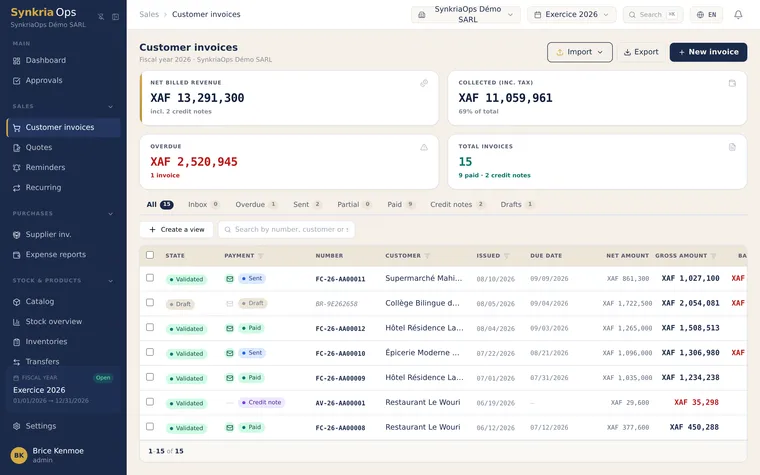
| Badge | What it means | Accounting |
|---|---|---|
| Draft | Invoice saved, not validated yet, no final number | No entry |
| To send | Validated, but not yet sent to the customer | Entry posted to the sales journal |
| Sent | Validated and sent, nothing collected yet | Receivable on the customer’s 411 account |
| Partial | Part of the amount has been collected | Receipt partly matched |
| Paid | The amount is fully collected | Customer account matched for this invoice |
| Overdue | The due date has passed and an amount is still owed | Receivable still open |
| Credit note | The document is itself a credit note | Entry reversing the invoice |
An invoice handed over outside SynkriaOps (WhatsApp, in person) stays To send: open it and click Mark as sent.
The invoice detail panel sometimes uses other words for the same states: Pending for a validated unpaid invoice, Partially paid for a partial invoice.
What each stage allows
Section titled “What each stage allows”| Action | Draft | To send / Sent | Partial | Paid | Overdue |
|---|---|---|---|---|---|
| Edit | ✓ | ✗ | ✗ | ✗ | ✗ |
| Delete | ✓ | ✗ | ✗ | ✗ | ✗ |
| Validate | ✓ | ✗ | ✗ | ✗ | ✗ |
| Send by email | ✓ | ✓ | ✓ | ✓ | ✓ |
| Record a payment | ✗ | ✓ | ✓ | ✗ | ✓ |
| Remind the customer | ✗ | ✓ | ✓ | ✗ | ✓ |
| Issue a credit note | ✗ | ✓ | ✓ | ✓ | ✓ |
Full or partial credit note
Section titled “Full or partial credit note”A credit note cancels all or part of a validated invoice. It carries its own entry, the reverse of the invoice’s: the sales account and VAT are debited, the customer account is credited.
- Full credit note: it covers the whole invoice amount. The customer owes nothing more; if they had already paid, you owe them a refund.
- Partial credit note: it reduces the amount due, for example for a discount granted afterwards or a dispute over one line. The rest of the invoice remains to be collected.
The procedure is described in Post and reverse an entry.
See also
Section titled “See also”- Create a quote: write and send a quote
- Create a customer invoice: issue an invoice
- Record a payment: enter a customer payment
- Automatic payment reminders: follow up unpaid invoices
- Reconcile counterparty accounts: match payments and invoices