Setting up a bank account
By the end of this page, you will know how to declare each of the company’s treasury accounts: bank account, cash register or Mobile Money wallet. This is the prerequisite for any transaction, whether entered by hand or imported from a statement. Each account is declared only once.
Prerequisites
Section titled “Prerequisites”- The Administrator, CFO or Accountant role.
- The account details: account number (or the wallet’s phone number), and for a bank, the IBAN and SWIFT code if they exist.
- To carry over an existing balance: the account balance and its date.
What SynkriaOps creates for you
Section titled “What SynkriaOps creates for you”You do not create any accounting account or journal by hand. When you save, SynkriaOps generates:
| Item | Bank | Cash | Mobile Money |
|---|---|---|---|
| Treasury account | 521xxx | 571xxx | 552xxx |
| Pending account | 471xxx | 471xxx | 471xxx |
| Dedicated journal | BQ1, BQ2… | CA1, CA2… | MM1, MM2… |
The number follows the last existing account with the same root. The pending account receives transactions whose third party is not yet identified. Each treasury account therefore has its own journal, as SYSCOHADA requires.
Adding an account
Section titled “Adding an account”-
Open Settings → Bank accounts. The Bank connections page lists your active accounts.
-
Click Add an account. The New treasury account window opens.
-
Account type: Bank (standard bank account), Cash (cash, petty cash) or Mobile Money (Orange Money, MTN MoMo…).
-
Name: the name shown throughout the application, for example
Afriland First Bank,Main cashorOrange Money shop. -
Account number: the bank account number, or the wallet’s phone number for a Mobile Money account. This field is required, including for a cash register (enter an internal reference, for example
CASH-01). -
For a bank only: SWIFT / BIC and IBAN (optional). Spaces and hyphens are removed and letters are converted to upper case when you save.
-
Initial balance and Initial balance date (optional): fill them in if the account already holds money when you start using it in SynkriaOps.
-
Check the Configuration preview: it shows the accounting account, the pending account and the journal that will be created.
-
Click Create account.
The Create account button stays greyed out until the name and account number are filled in.
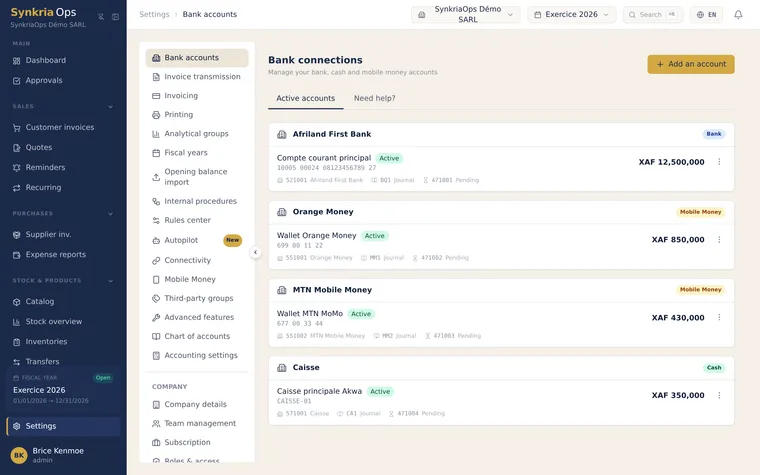
Carrying over an existing balance
Section titled “Carrying over an existing balance”If you enter an initial balance, SynkriaOps records a posted Solde d’ouverture (opening balance) entry in the account’s journal, on the date you entered (or today’s date if none):
| Initial balance | Debit | Credit |
|---|---|---|
| Positive | Treasury account (5xxxxx) | Pending account (471xxx) |
| Negative | Pending account (471xxx) | Treasury account (5xxxxx) |
Editing or disabling an account
Section titled “Editing or disabling an account”Each account’s menu, on the Bank connections page, offers:
- Edit linked account: replace the automatically created class 5 account with another class 5 account from your chart, for example to keep an existing numbering;
- Disable: restricted to the Administrator and CFO roles. The account disappears from entry and import lists; its transactions and entries are kept.
Fixing common errors
Section titled “Fixing common errors”| Message or situation | Cause | Solution |
|---|---|---|
| Create account button greyed out | Name or account number missing | Fill in both required fields |
| IBAN refused | The IBAN contains characters other than letters and digits (dot, slash…) | Copy the IBAN from your bank details, without punctuation |
| SWIFT code refused | The code does not have 8 or 11 characters | Check the code with your bank |
| The account does not appear in entry or import | Account disabled | Check the Active accounts list |
Next step
Section titled “Next step”Your account is ready. You can now: