Create an accounting voucher
By the end of this guide, you will know how to enter an accounting voucher — a set of entries posted to the same journal, on the same date, balanced debit/credit — then validate it and verify its authenticity. A validated voucher becomes immutable (no modification allowed, only contra-entry possible) and receives an integrity seal, in line with NF203 / SYSCOHADA art. 24 requirements.
Enter the voucher
Section titled “Enter the voucher”-
Accounting → Vouchers → New voucher.
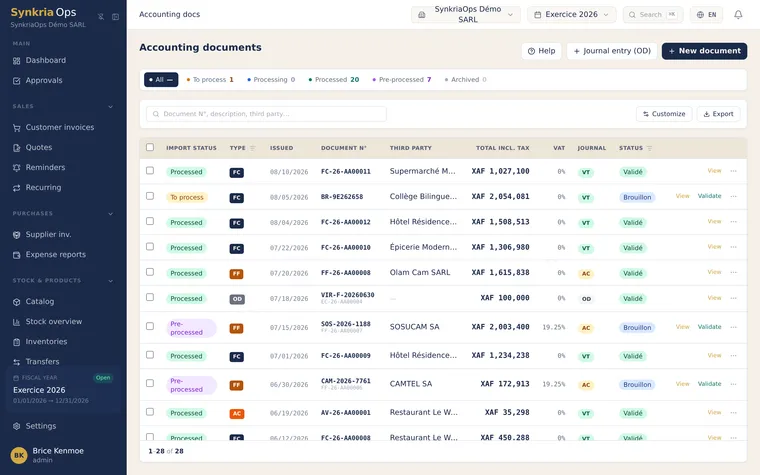
The voucher list: drafts and validated vouchers, each with its sequential number. -
Choose the journal (sales, purchases, bank, miscellaneous, opening balances). This determines the numbering prefix (e.g.
VTE,ACH,BNQ,OD,AN). -
Enter the date (must belong to an open fiscal year — otherwise SynkriaOps blocks creation).
-
Add the entry lines:
- Account number (autocomplete from the SYSCOHADA chart of accounts)
- Label
- Debit OR credit amount (never both on the same line)
- Optional: external reference (invoice number, analytical code, reconciliation)
-
Total debits must equal total credits. The header banner shows the difference in real time — validation is blocked while
debit ≠ credit.
Validate and number the voucher
Section titled “Validate and number the voucher”While the voucher is in DRAFT status, you can modify it freely. Validation
triggers:
-
Sequential numbering:
VTE-2026-000123is assigned in strict sequence. Two people cannot validate the same voucher at the same time — no number can be skipped or duplicated, even when several team members work simultaneously. -
Integrity seal: the voucher receives an integrity seal computed from its content and the previous voucher of the tenant. Each voucher is thereby chained to the previous one: any later modification would break the chain and be immediately detected.
-
Database-level lock: the amounts, accounts and dates of validated lines are protected at the database level itself. Any attempt to modify or delete them is refused and leaves a trace — not even a technical incident can alter a validated voucher.
Verify a voucher’s integrity (QR code)
Section titled “Verify a voucher’s integrity (QR code)”Each validated voucher PDF embeds a verification QR code. Scanning this QR verifies in an instant:
- The voucher’s authenticity (secure, tamper-proof verification link)
- That current content matches the recorded integrity seal
- The author and validation date
Compliant with SYSCOHADA art. 24 (10-year retention) — useful for tax inspections or external audits.
Example — client invoice
Section titled “Example — client invoice”| Account | Description | Debit | Credit |
|---|---|---|---|
| 411000045 | Client SARL ABC | 1 192 500 | |
| 701000 | Consulting service sale | 1 000 000 | |
| 4431 | Output VAT 19.25% | 192 500 | |
| Totals Balanced entry | 1 192 500 | 1 192 500 XAF | |
The entry is balanced: validation is allowed.
Common errors
Section titled “Common errors”| Error | Cause | Solution |
|---|---|---|
| ”Debit ≠ Credit” | Unbalanced lines | Add an adjustment line or fix amounts |
| ”Fiscal year closed” | Date in a closed year | Pick a date in an open fiscal year |
| ”Account 411xxx not found” | Counterparty not yet created | Create the counterparty (auto-generates the 411 sub-account) |
| “Validated voucher — edit not allowed” | Editing an already-validated voucher | Create a contra-entry instead |