SYSCOHADA liasse and notes (1 to 47)
This guide shows you how to generate the official plaquette and complete the notes numbered 1 to 47 that must accompany the SYSCOHADA revised 2019 summary statements. This is one of SynkriaOps’s major strengths: these notes are generated automatically from your accounting data, rather than re-entered by hand.
Three types of notes, one screen
Section titled “Three types of notes, one screen”Not every note is filled in the same way, and SynkriaOps shows that clearly instead of hiding it:
| Type | What you see | Example |
|---|---|---|
| Auto-filled | ”Auto-calculée” badge — the amount comes straight from the general ledger, nothing to enter | Note 3A (gross fixed assets), Note 27 (debt schedule) |
| To complete | Counted under “to complete” until a text area or manual table has been filled in | Note 13 (list of shareholders), accounting methods |
| Free note | You create it yourself — no SYSCOHADA code required, for a commitment or event specific to your file | ”Ongoing litigation”, “Subsequent event” |
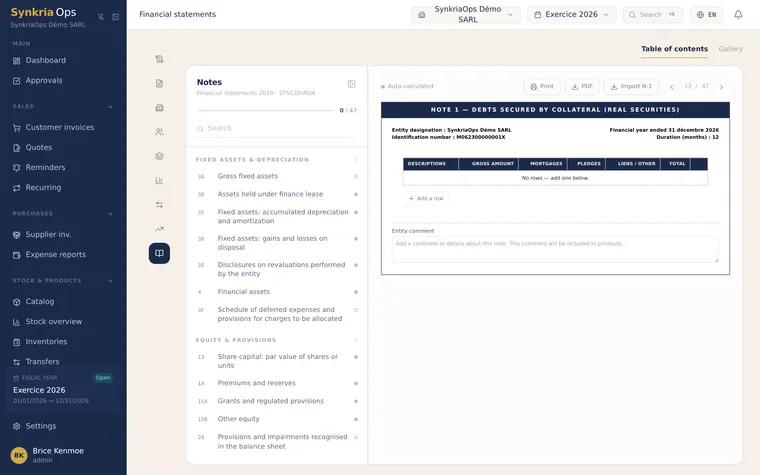
The Notes screen always shows a progress count (e.g. “12/47”) that distinguishes auto-filled notes from ones still to complete — you always know what’s left before closing the bundle. Two views are available: Summary (list of the 47 notes with their status) and Gallery (a visual preview of each note).
Generating the official plaquette (liasse)
Section titled “Generating the official plaquette (liasse)”The official plaquette bundles all summary statements into a single document, ready for filing and for presentation to shareholders, the bank or the authorities:
- Cover page and R1/R2/R3 sheets — company identification, filled in automatically
- SYSCOHADA balance sheet (Assets / Liabilities)
- Income statement
- TFT — statement of cash flows
- TVCP — statement of changes in equity
- Notes 1 to 47, including your free notes
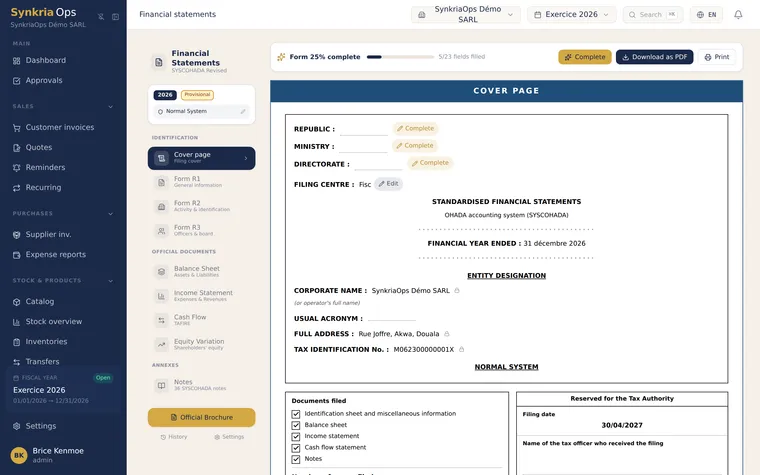
From the navigation bar: Financial Statements → Official plaquette. Select the fiscal year, tick the statements to include, then generate.
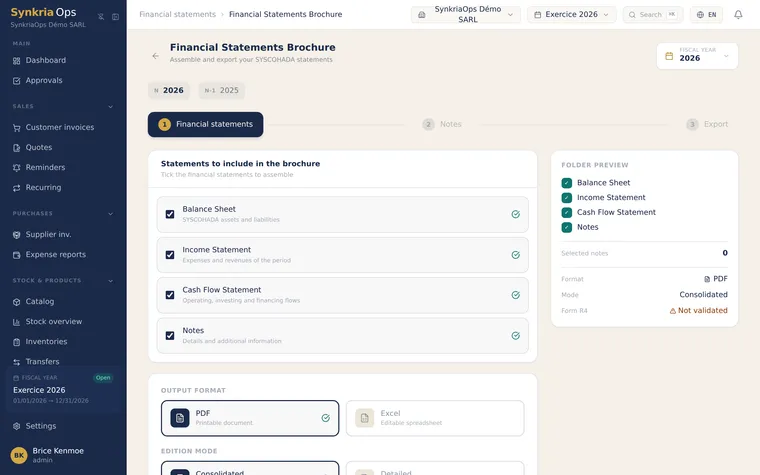
Generating and completing the notes
Section titled “Generating and completing the notes”-
Open the Financial Statements page, select the fiscal year, then click the Notes tab (the notes are not a separate page: they are part of the Financial Statements page).
-
Each note is displayed pre-filled with the amounts from your accounting (columns N / N-1 / variation depending on the note).
A note pre-filled from your entries: columns N, N-1 and change. -
Fill in the free-text areas (accounting methods, significant events, commitments) where the note requires it.
-
For manual-entry notes (e.g. Note 13 — list of shareholders, or the fixed-asset grids 3B/3D/3E), fill in the rows in the provided table.
-
Need to explain something SYSCOHADA doesn’t provide for (ongoing litigation, a subsequent event)? Click New free note: it joins the bundle with no SYSCOHADA code required.
-
Check consistency: the total of each note must match the balance sheet or income statement line it details.
Saving time from one year to the next
Section titled “Saving time from one year to the next”- Prior-year import: bring forward, in one click, the free texts and note settings from the N-1 fiscal year as a starting point for N.
- Persisted custom text: your note wording is kept per fiscal year and reusable.
- Overrides: occasionally adjust a computed line when the regulatory presentation requires it, keeping a trace of the override.